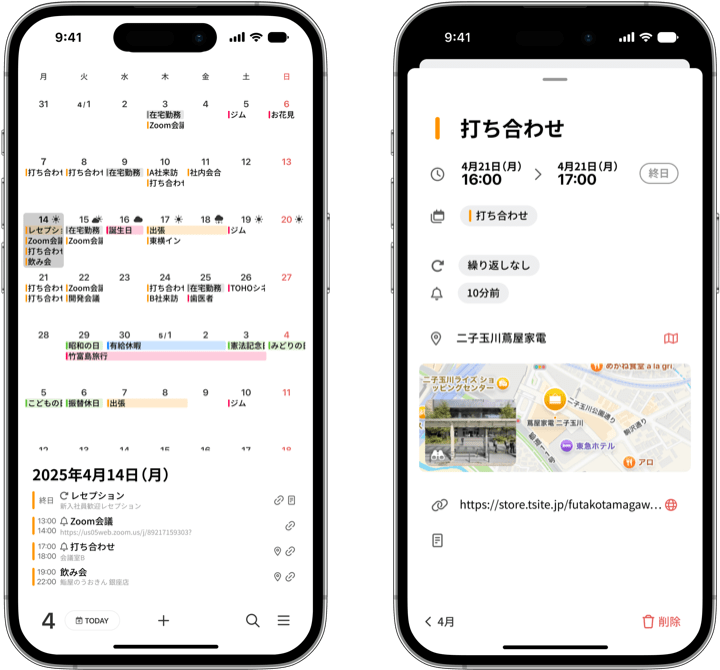
Thank you for using months.
We have just released the new version, ver. 1.9.
This update focuses on making it easier to enter and manage your events — with improvements inspired by the requests you have sent us.
Double-tap the calendar to add an event
Simply double-tap a date to start creating an event for that day.
The moment you think “I want to put something on this day,” just tap-tap — and you are already typing.
Adding a new plan now takes fewer steps than ever.
Of course, the usual way of entering events from the event palette still works, so you can use whichever you prefer.

Attach files to your events
Meeting documents, concert tickets, event invitations——.
You can now attach the files you will need on the day directly to the event itself.
No more digging through emails and folders wondering “Where did I save that ticket?” — just open the event on your calendar and it is right there. Your plans and everything you need for them, together in one place.

The time picker now uses 5-minute increments
We have changed the time picker from 1-minute to 5-minute increments. It is now much quicker to land on the times you actually use — like 10:05 or 14:30 — without fine-scrolling through every single minute. Entering events feels just that little bit nicer.
Need minute-level precision? Tap the time in the picker and a keyboard appears, so you can still type an exact time like 14:32 directly.

Support for smaller text sizes
months supports iPhone’s text size settings (Dynamic Type), and in ver. 1.8 we have adjusted the minimum size so you can now choose smaller text than before.
With smaller text, the monthly view shows more of each event’s title. If you want to see your plans in more detail at a glance, give it a try in Settings → Accessibility → Display & Text Size → Larger Text, and move the slider to the left.
Adding the “Text Size” control to Control Center makes this even handier — you can adjust the size on the spot without opening the Settings app (the screenshots below show 100% and 85%). And if you operate the slider while months is open and choose “This App Only,” you can make the text smaller in months while leaving every other app unchanged.

We have also made various small refinements and optimizations.
Many of the improvements in this update came directly from the voices of our users.
Have feedback or a feature request? We would love to hear from you via Contact in the app.
months keeps evolving to be the calendar you will want to open every day.
Give ver. 1.8 a try — and if you have not tried months yet, it is free for one week.