


iOS 26 introduces a handy new feature that makes adding event information to your calendar even easier. It’s called “Add to Calendar.”
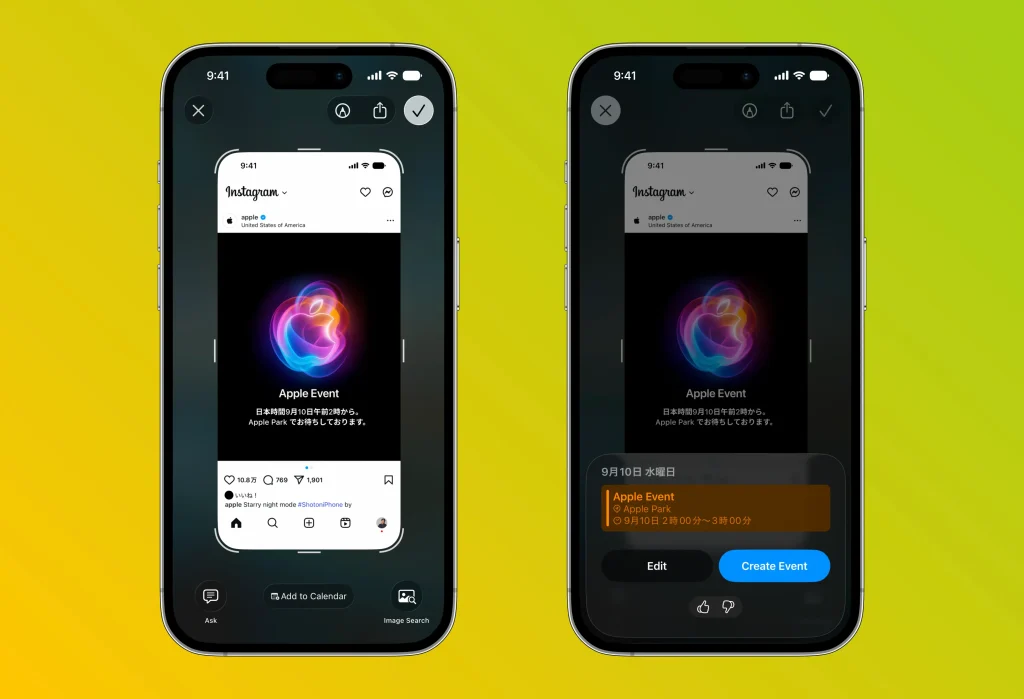
When you take a screenshot of a screen showing event details, an “Add to Calendar” button automatically appears at the bottom of that image. For example, if you capture a concert ticket screen or the information page for a lecture, it reads details such as the date, time, and venue, and automatically creates a calendar event.
Until now, you had to look at this information and type it into your calendar app one item at a time. From now on, all you need to do is tap this button. After that, you simply review the details and register the event, making the whole process incredibly smooth.
By eliminating the hassle of entering schedules, this new feature looks set to be a real time-saver for anyone with a busy day-to-day life.
⚠️ Please note
iOS 26 beta is in-development software that Apple provides to developers.
Please install the beta OS entirely at your own risk.
In the unlikely event that months, any other app, or your device experiences unexpected problems, we cannot accept any liability, so please understand this in advance.




