


With the Yahoo Norikae Annai app, you can easily add the route information you’ve searched for to your iPhone’s calendar. Just follow the steps below.
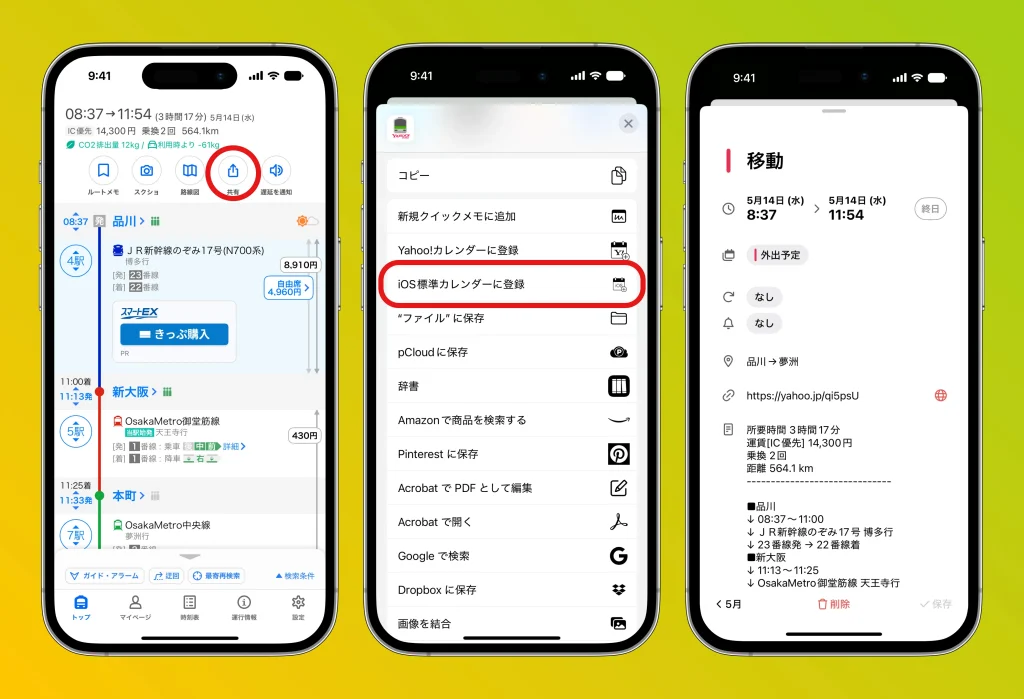
1. Search for a route
Open the Yahoo Norikae Annai app and search for a route by entering your departure point, destination, date, time, and so on.
2. Choose the route you want to register
From the search results, tap the route you want to add to your schedule to display its details.
3. Select “Add to Calendar”
Tap “Share” at the top of the details screen, and choose “Add to iOS standard Calendar” from the menu.
4. Edit the calendar event
The calendar registration screen opens, so review and edit the title, time, notes, and more. You can also change notification settings as needed.
5. Tap “Add” to save
Once you’ve reviewed the details, tap “Add” in the top right of the screen to save the event to your calendar.
With these steps, you can manage your travel plans without forgetting them.
Be sure to make use of it when planning meetings or trips!
If you want to review all your registered events at a glance, we recommend “months,” a calendar app that lets you grasp both your monthly schedule and daily events at a glance with vertical scrolling.




