


months (a vertical-scroll calendar) has the advantage of giving you an excellent overview of your schedule at a glance. It is especially convenient when you want to review several months of events at once or plan a long-term schedule, since you can browse simply by scrolling vertically.
However, there is also a challenge: while scrolling, it can be hard to tell at a glance where one month changes to the next. For example, when the last day of one month and the first day of the next are displayed consecutively on screen, it can be difficult to notice that they belong to different months. This can sometimes lead to mistakes when checking or adding events.
This is where the ” Emphasize month boundaries” feature comes in handy. By turning this feature “on,” a clear dividing line is drawn at the break between each month displayed on the calendar. The boundary line is designed to be visually easy to read, making the divisions clearly visible.
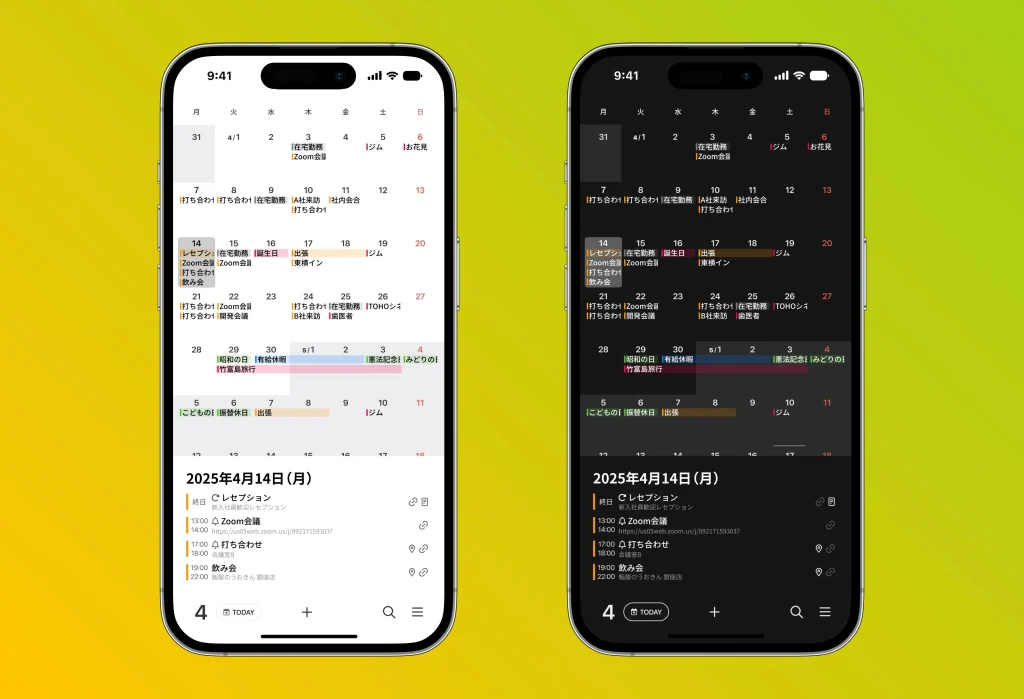
Turning on the “Emphasize month boundaries” feature is very simple.
Just go to the settings screen and turn on ” General” → ” Emphasize month boundaries” to enable it.
By making it easier to organize information visually, you can help prevent oversights and input errors, improving the accuracy of your everyday schedule management. In particular, for those who have many events that need to be managed on a monthly basis—such as project deadlines, end-of-month processing, or payroll dates—the ” Emphasize month boundaries” feature is an extremely useful option.
Be sure to make the most of this feature to make your calendar even easier to read and even easier to use.




