


Thank you for always using “months“.
In this update (v1.2), we’ve made the long-awaited major enhancement to widgets!

Widget Lineup
With this update, the variety of widgets you can place on your home screen has increased significantly, letting you display information to suit your needs and preferences. Every widget automatically switches to match your device’s appearance mode (light / dark), with a design that’s easy on the eyes even in dark places.
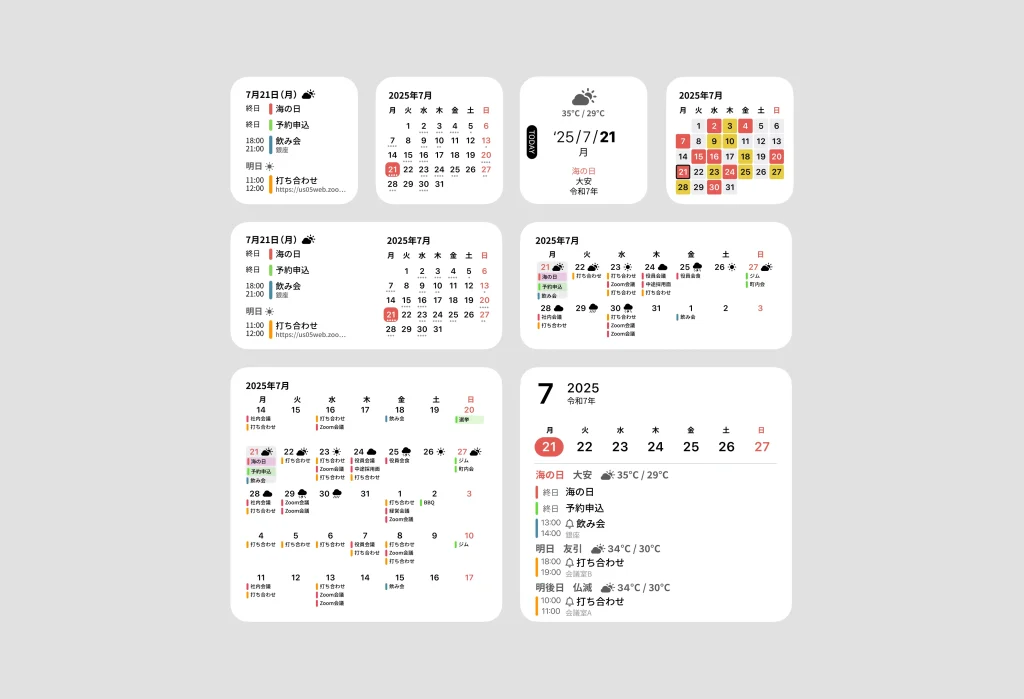

Upcoming Events (1 X 1)
Displays your events for the next few days along with the weather forecast.
Month View (1 X 1)
A simple month view. See today’s date, and grasp how many events you have via the indicator beneath each date.
Today (1 X 1)
Displays the weather, temperature, Japanese era name, Rokuyo, and holidays.
Today’s date is emphasized for excellent readability.
Heatmap (1 X 1)
Features a heatmap that uses color to show how busy each day of the monthly calendar is.
Red indicates days with especially many events, yellow indicates days with a fair number of events, and white indicates days with relatively few events.
Upcoming Events and Month (1 X 2)
A widget combining your events for the next few days with a month-view calendar.
Upcoming Week (1 X 2)
Check two weeks of events at a glance.
Events are color-coded for high visibility, and you can quickly grasp the weather forecast as well.
Upcoming Week (2 X 2)
View events from the week before today up to four weeks ahead. Its high overview makes it easy to grasp your schedule.
Week and Upcoming Events (2 X 2)
View a one-week calendar alongside your events and the weather. It also supports Japanese era name, Rokuyo, and holiday display, and lets you check upcoming events with their times.
You can use months widgets on macOS, too.
Add the same widgets to your Mac desktop and check information like your calendar and the weather at a glance.
Just add them from the Mac widget gallery!

Don’t forget to update!
Update to the latest version on the App Store right now and add the new widgets to your home screen. months will keep making your everyday life easier to see and smarter.




