


Once again, the end of the year is drawing near. When you try to look back through your planner and ask, “What did I even do this year?”, you may find too many blank pages, or no way to see it all at a glance. And when you check your digital calendar, do you ever feel a little wistful at the rows of cold, impersonal entries like “Meeting” or “Business trip”?
This year, though, was different.
That’s because my iPhone has “months” on it.
On a whim, I opened the search screen in months and searched for “#exhibition,” a keyword I’d added to my events ahead of time. Up popped a long list of the art museums, museums, and galleries I’d visited this year.
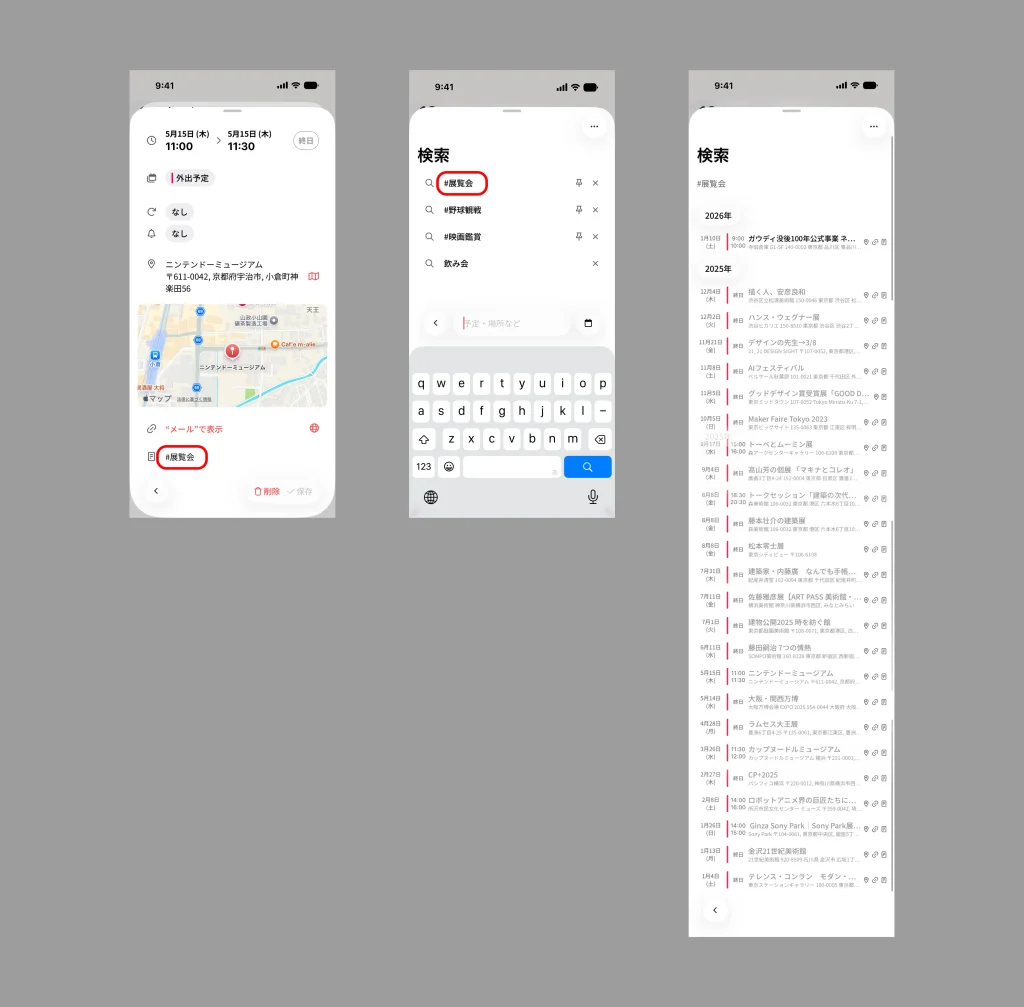
“Oh, it’s already been this long since I went to the Nintendo Museum.”
“I met Sou Fujimoto in person at his exhibition and got his autograph.”
“Wait—I went to this many?!”
What I found there wasn’t just a string of appointments; it was an “activity log” of the moments that moved me. The experience was so rich and convenient that I’d love to share the joy of “looking back” with months, and the “pinned search” feature that makes it possible.
The moment your calendar becomes a personal timeline of your year
Most calendar apps are built to manage “future plans.” But the greatest charm of months is that “the past and the future are seamlessly connected.” The screen glides smoothly as you vertical-scroll, so going back through past events is effortless.
What impresses me most is the keyword search feature.
I love going to exhibitions and art museums, so whenever I add an event, I always put the keyword “#exhibition” in the notes field. And this is where months truly shines.
With an ordinary app, you’d have to type “exhibition” into the search box every single time. But months has a feature that lets you “pin the searches you use often.” It may seem like a small thing, but it’s incredibly handy.
How “pinned search” changes the way you relate to your calendar
It’s simple to use. Just “pin” a keyword you’ve searched once to the search screen.
Once you do, the “#exhibition” link always appears at the top the moment you open the search screen, and a single tap instantly pulls up the records of every exhibition you’ve been to.
It’s such a small thing, yet this ease of “calling it up with one tap” dramatically changes the role your calendar plays.
Zero typing effort:
Because you don’t have to type it out every time, it’s far easier to check “When does that exhibition run until?” on the go or in a spare moment.
Timelines by theme:
If you create pins not just for “#exhibition” but also for “#movies,” “#sports,” “#business-trips,” and other pillars of your hobbies and life, you can look back at “your own history,” sliced by each theme, anytime.
It feels like having a dedicated page for your own “exhibition log” or “movie record” right inside your calendar.
The screenshot at the top of this article is the actual screen I get when I pin and display “#exhibition” in months.
“Expo 2025 Osaka, Kansai,” “Masahiko Sato Exhibition,” “Hans Wegner Exhibition”… Seeing them listed like this gives me a small surge of confidence—not that I merely “got through my schedule,” but that “I went out and did all of this for the sake of my own curiosity.”
Pair months with the Photos app, and your memories grow even more vivid.
Just looking back on your past activities in months is enjoyable on its own, but let me share one more “combo move” I practice: teaming it up with the iPhone’s built-in “Photos” app.
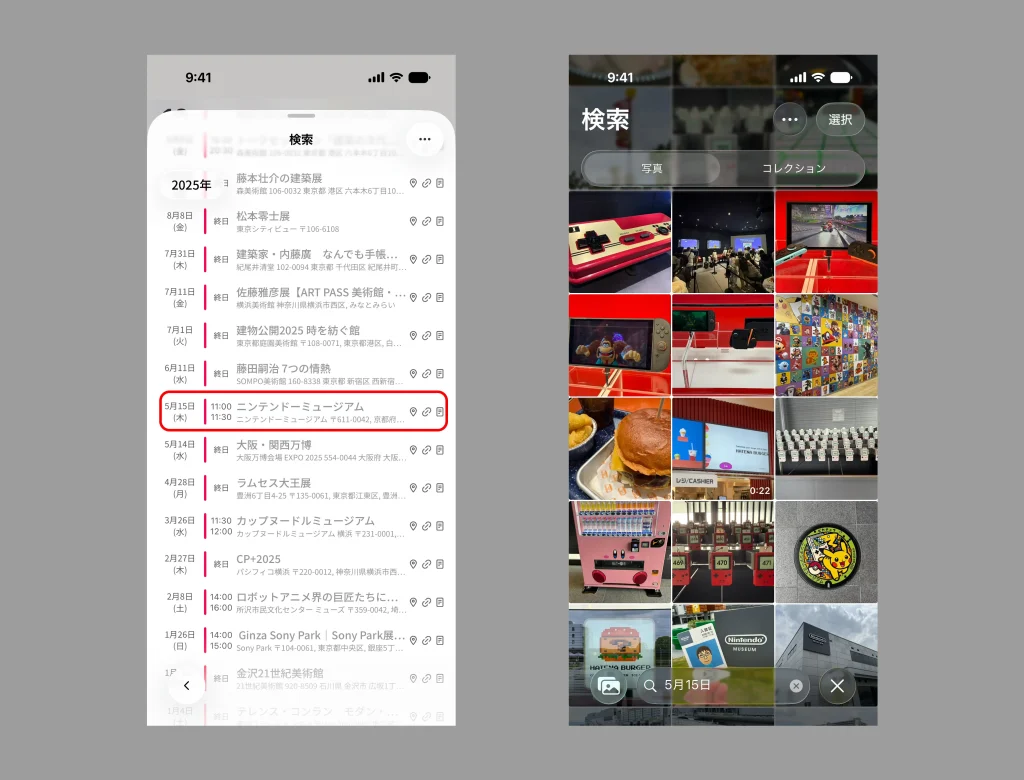
Say you found the event “May 15, Nintendo Museum” in your months search earlier. Once you think, “Ah, that was fun,” just remember that date—”May 15.”
Now, open the iPhone’s “Photos” app and type “May 15” straight into the search box.
Only the photos from that date will line up before you. When you actually try it, it’s more moving than you’d expect.
By moving back and forth between these two apps, a simple schedule check turns into a rich “trip down memory lane” all your own. When you look back on the past with a pinned search like “#exhibition” or “#travel,” be sure to pair it with this “photo date search” too. You’re sure to rediscover wonderful moments you’d forgotten.
In the midst of our busy days, we tend to forget the things we’ve done.
But if you record them in months and look back with a quick search, you can truly feel, “Ah, I had a good year this year, too.” What starts as managing your future plans turns, before you know it, into cherishing your past memories as well.
months is an app that makes the flow of time feel that dear.
Why not record the things you love—say “#movies” or “#sports”—in months along with your schedule, and pin them too?
When you press that button at year’s end, a wonderful panorama of your year is sure to come into view.
Take this chance to give months a try.




