


“months,” the iPhone-only calendar, now offers a 1-week free trial with no subscription sign-up required. Operated entirely with your thumb and built on a zero-screen-transition design that shows the “month” and the “day” at the same time, it comfortably supports your hectic year-end and New Year season.
Grasp your packed year-end and New Year schedule intuitively, “with a single thumb”! The iPhone-only calendar app “months” delivers a brand-new calendar experience.
months eliminates the “month view” vs. “detail view” switching (screen transitions) that most calendar apps rely on. It integrates a “vertical-scroll calendar” and a “resizable event palette” into a single screen. The flow from the bustling end of December into the new year can be managed more smoothly than ever before.
And to let as many people as possible experience this unique design and feel for themselves, we’re offering a 1-week free trial that requires “no subscription sign-up.”
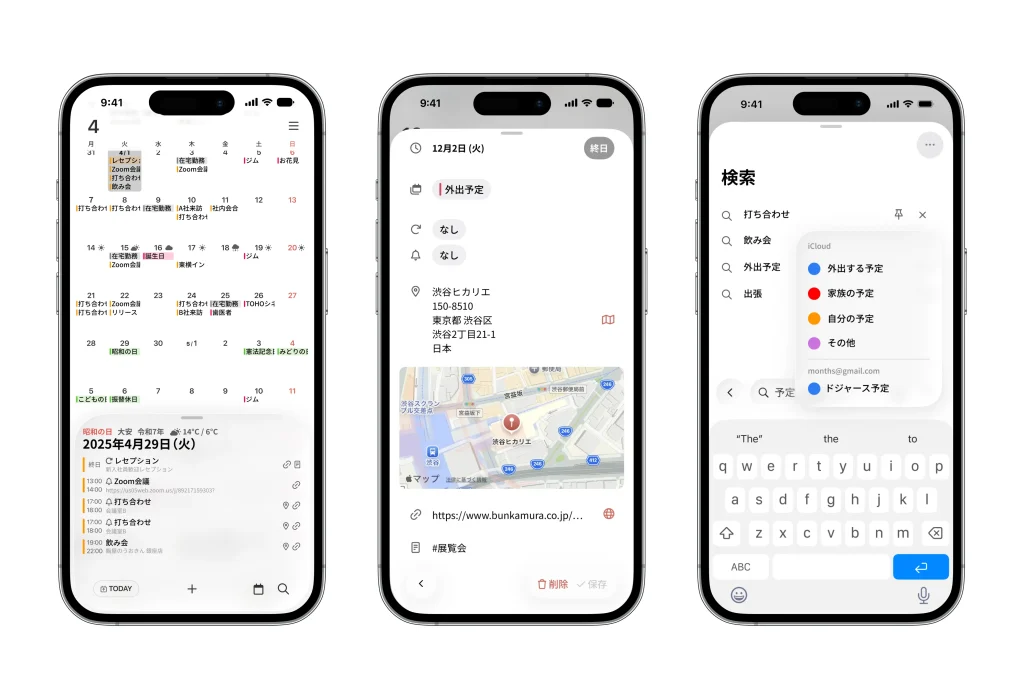
■ Solving the challenges of the “vertical-scroll calendar”
“Vertical scrolling” has become common in standard calendar apps. However, to check details you had to tap through to a separate screen, which created the problems of “losing sight of the whole month’s flow when you view the details” and “the hassle of getting back to the month view.” months offers an answer to this challenge: “don’t switch screens at all.”
■ The decisive difference that makes “months” the choice: three points of “convenience”
1. “Simultaneous display” of the calendar and the detail palette
The biggest feature of months is a layout that constantly shows the “monthly calendar” at the top of the screen and “that day’s event palette” at the bottom. When you tap a date on the calendar, that day’s events instantly surface in the palette below—without the screen changing. This lets you check the details of a given time pinpoint-precisely, without losing sight of the surrounding schedule (the context). The palette height can be adjusted across three levels (minimum, medium, maximum) to match the amount of information, optimizing it for the viewer’s needs.
2. Minimizing hand and eye movement
On today’s larger iPhones, moving your finger to the top of the screen is a strain. months gathers not only the main control buttons but also the event-checking area (the palette) at the bottom of the screen. “Scroll to pick a date” → “view the details” → “add an event”—because all of these actions are completed within the thumb’s reach (the lower half of the screen), you can operate it comfortably even while on the move with your hands full during the year-end.
3. Instantly recall the past and future with “pinning”
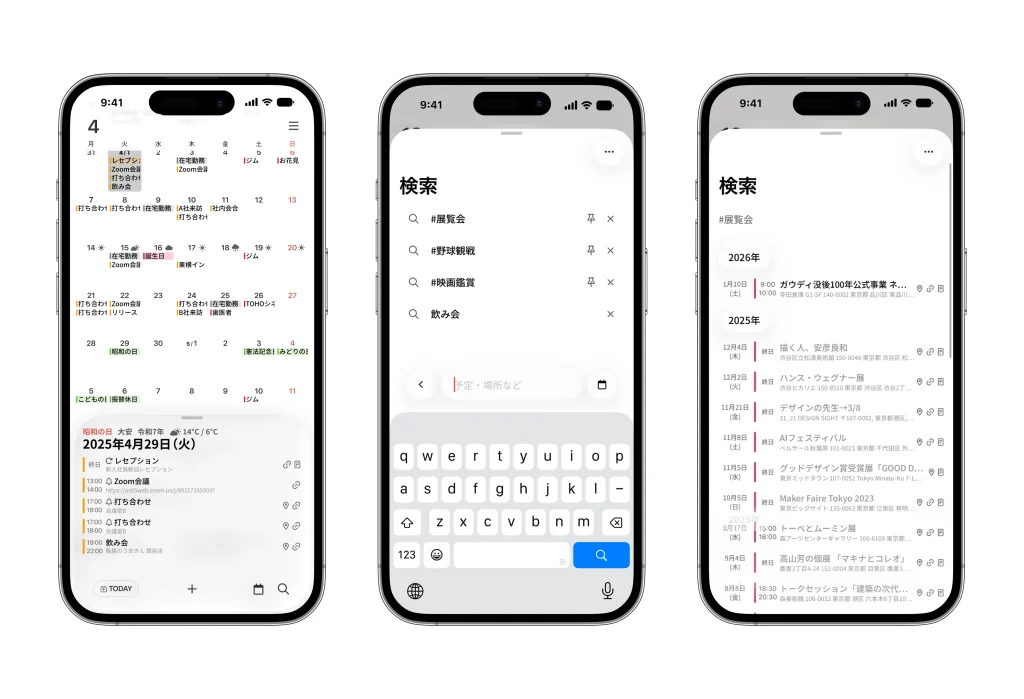
It’s not just about checking events—the search feature is powerful, too. It includes a function to “pin” frequently searched keywords (e.g., “#exhibition,” “#meeting”) to the search screen. Because you can call up a list with a single tap instead of typing every time, looking back on your past activity log and managing routine tasks become dramatically smoother.
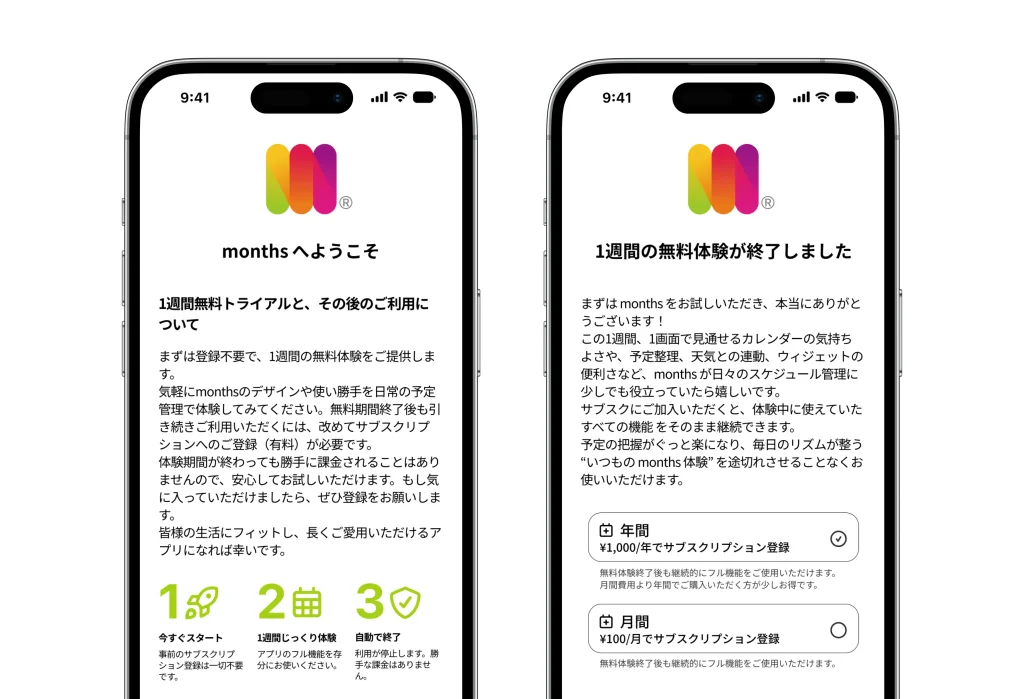
■ No worries about “forgetting to cancel.” Try it for a week, with zero risk.
Switching to a new calendar app takes courage. To lower that hurdle as much as possible, months offers a 1-week free trial.
Its biggest feature is that “no advance subscription sign-up is required.”
You don’t need to enter credit card information or enter into a subscription contract when you start the trial. You will never be charged automatically after the trial period ends; only if you like it can you then consider a paid plan. Without the worry of “being charged without consent,” take your time trying it over the year-end and New Year season.
■ Refined, functional beauty that fits into everyday life
Liquid Glass UI
A beautiful design with the transparency and depth of frosted glass, in harmony with the latest OS.
Rokuyo and Japanese-era display
Supports displays such as Taian and Butsumetsu (the Rokuyo lucky/unlucky days) and Reiwa (Japanese era names), catering to Japanese business and ceremonial needs.
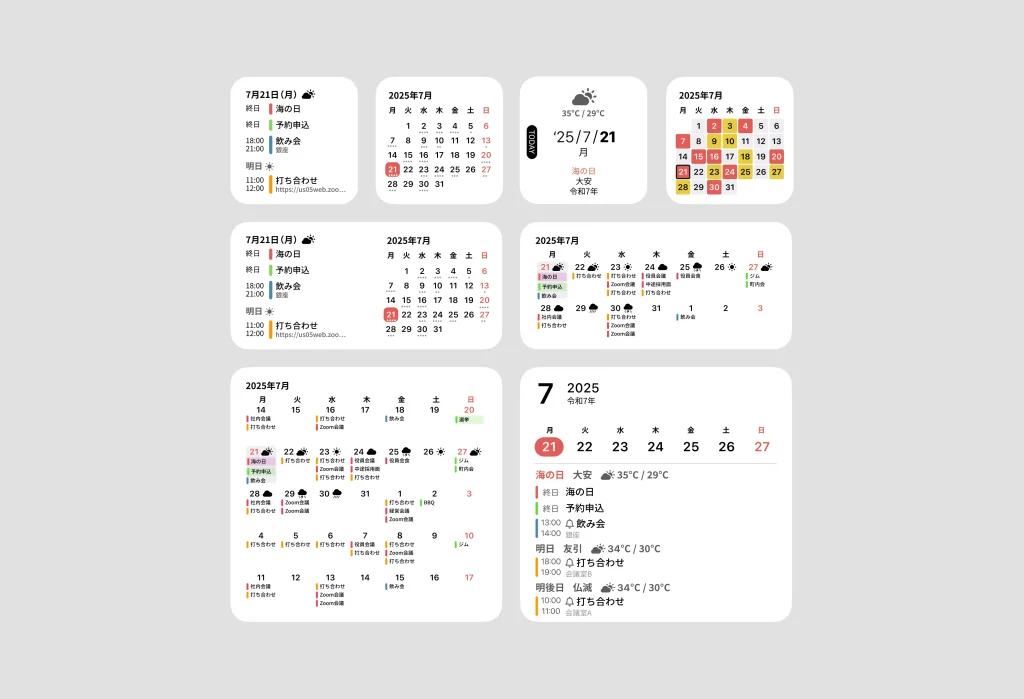
Home Screen widget
Check your “calendar + event list” right on the Home Screen without opening the app. Also supported on the Mac desktop.

■ App overview
App name: months
Supported OS: iOS (iPhone only)
Price: ¥100/month, ¥1,000/year (subscription)
*Includes a 1-week free trial (no automatic billing)
Download: https://apps.apple.com/us/app/id6739420415
Official site: https://months.jp
Inquiries regarding this matter: https://forms.gle/9MuFBY6cVEUNnqdUA
—
PR TIMES
Company: For You, Inc.
Title: See the flow of the month and the day’s schedule “at the same time.” “months,” the zero-screen-transition iPhone calendar, proposes stress-free schedule management for the new year.
Distribution date and time: December 18, 2025, 10:30
Scheduled URL: https://prtimes.jp/main/html/rd/p/000000004.000163236.html




